This Malwarebytes (MWB) blog story is interesting, but the information afterwards is useful: setting up Apple’s / Android’s Find My / Find Device service on your smartphone.
In practical terms, this meant that the phone could be remotely wiped (via Find My) and essentially turned into a paperweight. This has a two fold advantage: Keeping valuable data out of the thief’s hands, and also making the phone considerably less useful to a criminal.
Apple provides several tips for what you should do in the event of a theft. Here’s some of the more pressing technical related suggestions [see article for details]: Lock your phone down, mark your phone as lost, erase the device remotely.
For an Android phone, “the basic Android options should always be available.” There’re Settings (and a Find Device app).
Update to iOS 16.2
Adjust the display settings
Keep it safe – get a case
Check out the new camera modes
Set an Emergency Contact and Medical ID
Set Photographic Styles
Take a trip to the Dynamic Island
Read the manual
You know the drill, correct? The latest operating system update (iOS) for your iPhone brings some new features and settings.
• Macworld > Tip > “If you’ve updated to iOS 16.2, do these five things right now” by Jason Cross, Senior Editor (Dec 29, 2022) – Whether you just got a new iPhone or just upgraded your existing iPhone to iOS 16.2, these are the first things you should do.
Table of contents
Customize your Lock_Screen
Encrypt all your iCloud data ***
Upgrade your Home
Scope out that new Weather app
Track your medications
*** Only if all of your Apple devices using your Apple ID have been updated to iOS 16.2, iPadOS 16.2, tvOS 16.2, or macOS 13.1. And you’ve made some sort of backup.
Note above caveat for this new feature:
A new feature in iOS 16.2, which Apple calls Advanced Data Protection, will enable end-to-end encryption on a lot more of your iCloud data – Photos, Notes, iCloud backups, and more. You’ll have the key and Apple won’t, so it’s safer from hackers or overzealous government demands.
Another article re recent Apple announcements for iOS 16.3, et al.
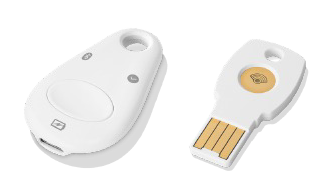
These hardware security keys have been around for years. If you already use one (like on your key ring) with your Apple devices for some apps or online logins – and meet Apple’s requirements, then this latest security feature might be useful – to strengthen two-factor (2FA) authentication.
Apple this week released iOS 16.3 and macOS Ventura 13.2, bringing an overdue feature to our Apple devices: Security key support for Apple IDs. That means you can use a USB-C, Lightning, or NFC dongle as the second factor of authentication instead of the six-digit verification code Apple usually sends to another device.
• Apple requires two FIDO Certified security keys (e.g., YubiKey).
• Your devices are using: iOS 16.3, iPadOS 16.3, or macOS 13.2.
See also:
• CNET > “New iOS Login Tech Makes It Super Hard to Hack Your iCloud” by Stephen Shankland (Jan 28, 2023) – Hardware security keys are the “gold standard” for locking down your online accounts (so even Apple can’t help you recover access).
(article’s image) Yubico’s basic YubiKey security keys cost $25 for a USB-A model and $29 for a USB-C model. Both also support NFC wireless connections. Credit: Yubico
The move follows hardware security key support from other tech companies, like Google, Microsoft, Twitter and Facebook parent Meta.
“This feature is designed for users who, often due to their public profile, face concerted threats to their online accounts, such as celebrities, journalists, and members of government,” Apple said in a statement. “This takes our two-factor authentication even further, preventing even an advanced attacker from obtaining a user’s second factor in a phishing scam.”
(quote) Google has been working on a Find My Device network, similar to Apple’s excellent Find My tracking service, for more than a year. Signs of the network first emerged in 2021, with the company teasing the feature with the December 2022 Play system update.
The feature will allow you to find your lost or stolen Android device or compatible accessories even when they are not connected to the internet. As a part of the feature, Google would be encrypting and storing the most recent location of your device.
Ahead of the network’s official launch, the company is rolling out a ‘Store recent location’ toggle for Find My Device.