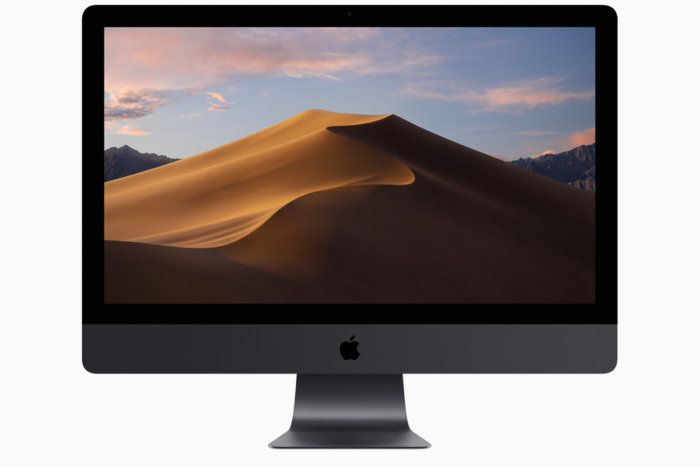
Today Apple officially released a new version of its macOS. The name of the new system — “Mojave” — celebrates the desert rather than the mountains of the High Sierra, and updates to version 10.14 from 10.13.6. Available on your Mac from the Apple Menu > App Store > Featured > Mac App Store, Apple touts Mojave as “simply powerful” with these highlights:
MacOS Mojave delivers new features inspired by its most powerful users, but designed for everyone. Stay focused on your work using Dark Mode. Organize your desktop using Stacks. Experience four new built-in apps. And discover new apps in the reimagined Mac App Store.
Dark Mode
• Experience a dramatic new look for your Mac that puts your content front and center while controls recede into the background.
• Enjoy new app designs that are easier on your eyes in dark environments.Desktop
• View an ever-changing desktop picture with Dynamic Desktop.
• Automatically organize your desktop files by kind, date, or tag using Stacks.
• Capture stills and video of your screen using the new Screenshot utility.Finder
• Find your files visually using large previews in Gallery View.
• See full metadata for all file types in the Preview pane.
• Rotate an image, create a PDF, and more — right in the Finder using Quick Actions.
• Mark up and sign PDFs, crop images, and trim audio and video files using Quick Look.Continuity Camera
• Photograph an object or scan a document nearby using your iPhone, and it automatically appears on your Mac.Mac App Store
• Browse handpicked apps in the new Discover, Create, Work, and Play tabs.
• Discover the perfect app and make the most of those you have with stories, curated collections, and videos.iTunes
• Search with lyrics to find a song using a few of the words you remember.
• Start a personalized station of any artist’s music from the enhanced artist pages.
• Enjoy the new Friends Mix, a playlist of songs your friends are listening to.Safari
• Block Share and Like buttons, comment widgets, and embedded content from tracking you without your permission with enhanced Intelligent Tracking Prevention.
• Prevent websites from tracking your Mac using a simplified system profile that makes you more anonymous online.Apple News
• Read Top Stories selected by Apple News editors, trending stories popular with readers, and a customized feed created just for you.
• Keep your favorite topics, channels, and saved stories up to date on your Mac and iOS devices.Stocks
• Create a customized watchlist and view interactive charts that sync across your Mac and iOS devices.
• Browse business news driving the markets curated by Apple News editors.Voice Memos
• Make audio recordings, listen to them as you work with other apps, or use them in a podcast, song, or video.
• Access audio clips from your iPhone on your Mac using iCloud.Home
• Organize and control all of your HomeKit accessories from your desktop.
• Receive real-time notifications from your home devices while you work.
The free upgrade is a 5.70 GB download, and claims compatibility with OS X 10.8 or later.
To install macOS Mojave, your Mac needs at least 2GB of memory and 12.5GB of available storage space to upgrade—or up to 18.5GB of storage space when upgrading from OS X Yosemite or earlier.
There are many articles online about Mojave. Here’re 3 articles by MacWorld:
- How to upgrade to macOS Mojave: Step-by-step instructions on upgrading to the latest Macintosh operating system
- MacOS Mojave: Apple releases the latest version of its Macintosh operating system: Everything you need to know about the new Macintosh operating system
- Mojave has three new apps that were originally iOS apps: Apple News, Stocks, and Voice Memos. There’s also a new Home app for managing internet-of-things devices.
- Apple names macOS after California locations, a method adopted in 2014 with OS X Yosemite. In case you’re wondering, it’s pronounced “Mo-HA-vey.” Mojave is a national preserve in the area between Los Angeles and Las Vegas, Nevada.
- 5 reasons why you should upgrade to macOS Mojave right now
- It’s not a major revamp of the operating system (it’s been a while since the Mac has had one of those), but it does add new features that can help you be more productive with your Mac.
- An OverSight-like feature is now built into Mojave that can alert you when an app wants to access the camera and mic, as well as iTunes device backups, Time Machine backups, your Mail database, your Message history, your Safari data, and other data.
- Mojave makes Quick Look most robust, providing simple editing tools so you don’t even need to open an app. Now when you preview an image (select it and then press the space bar), you can click on the Quick Actions icon between the Rotate icon and the Open in Preview button, and a set of editing tools appears.
As with any macOS upgrade, best practices are to backup your current Mac’s hard drive (using Time Machine and/or SuperDuper) and do the installation when you’re not stressed and when you do not need to use your Mac for an hour or two. Then give yourself some time afterwards to acclimate to the new look of some things.